SkySubmit
Create invoices, quotes & job reports — fast, offline, and professional.

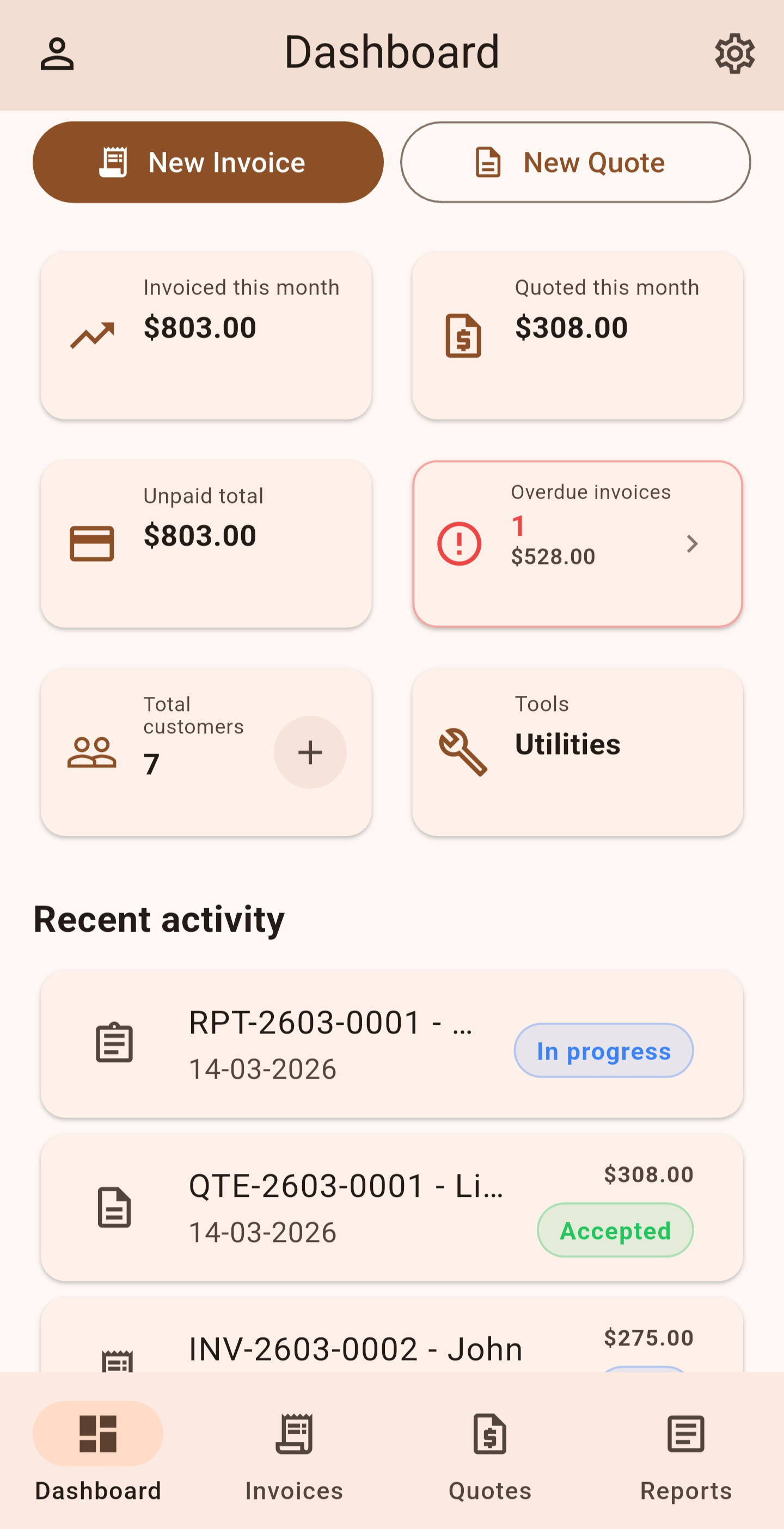
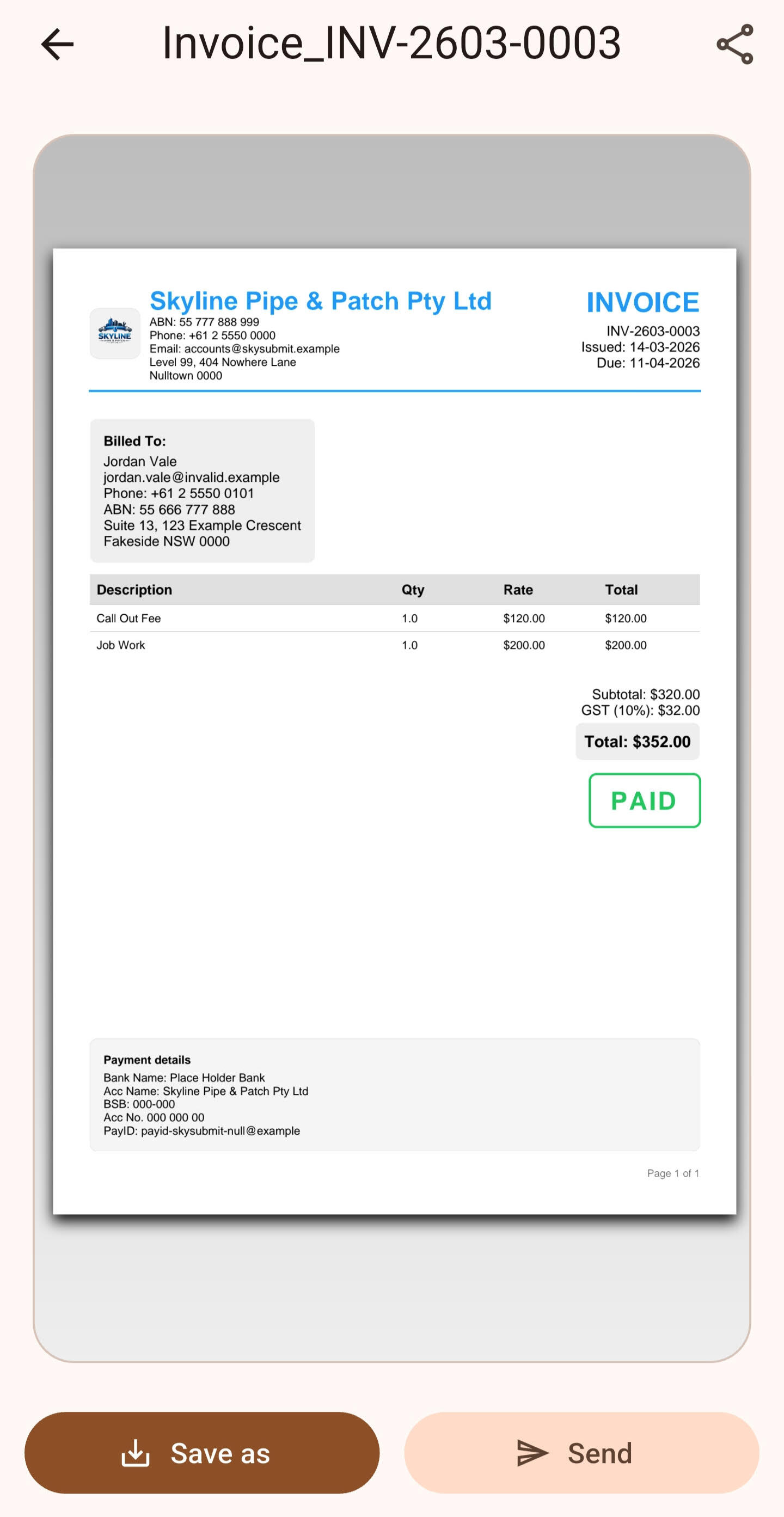
Fast documents
Create clean, professional PDFs in seconds — send via email, share, or save in one tap.
Offline-ready
Work anywhere, even without signal — generate and send documents offline.

Powerful job reports
Capture job details that matter — structured reports with photos, findings, and severity, ready to share or attach.
Attach reports
Send complete job documentation — attach reports to invoices so clients get the full picture.

SkySubmit makes business admin easy. Create invoices, quotes, and job reports that look professional, work offline, and are ready to send whenever you are.
2026 SkySubmit. Email: [email protected]
SkySubmit – Privacy PolicyLast updated: 8 July 2026⸻1. IntroductionSkySubmit ("SkySubmit", "we", "our", or "us") respects your privacy and is committed to protecting your personal information.This Privacy Policy explains how information is collected, used, stored, and protected when you use the SkySubmit mobile application (the "App").By using SkySubmit, you acknowledge that you have read and understood this Privacy Policy.⸻2. Information We CollectSkySubmit collects only the information necessary to provide its core functionality.Information you provideDepending on how you use the App, this may include:* Your email address (when creating or signing into an account)
* Your business name, contact details, and business information
* Customer information that you choose to store, including names, email addresses, phone numbers, postal addresses, tax identifiers, and notes
* Invoices, quotes, reports, notes, photos, attachments, and other content you create within the App
* Feedback or support requests that you choose to send to usContacts (Optional)If you choose to use the Contacts tab, SkySubmit will request permission to access contacts on your device.Contacts are displayed for your convenience only and are not automatically imported or synced to the cloud. Contact information is only saved in SkySubmit if you explicitly choose to add a contact as a customer.SkySubmit only accesses your contacts after you grant permission.Automatically collected informationSkySubmit may collect limited technical information, including:* Authentication identifiers required for secure sign-in
* App version and basic device information necessary for stability and performance
* Subscription and purchase status information (via RevenueCat)
* Anonymous analytics events that help us understand app usage, diagnose issues, improve reliability, and enhance the user experience (such as feature usage, subscription events, and feedback actions)SkySubmit does not use your information for advertising purposes.⸻3. How We Use InformationYour information is used solely to:* Authenticate your account
* Enable optional cloud backup and synchronization features. Some cloud features may require an active Pro subscription.
* Allow you to create, edit, store, export, and manage invoices, quotes, reports, customers, and business information
* Let you optionally browse device contacts and add individual contacts as customers when you choose
* Process subscriptions and manage access to premium features
* Provide optional address lookup suggestions when you search for an address
* Improve app reliability, stability, usability, and performance
* Respond to feedback and support requests you send usSkySubmit does not sell, rent, or trade your personal information.⸻4. Third-Party ServicesSkySubmit uses trusted third-party providers to deliver essential functionality, including:* Firebase Authentication – secure account sign-in
* Cloud Firestore – account services and optional cloud synchronization used by SkySubmit's cloud features. Some cloud features may require an active Pro subscription.
* Firebase Storage – secure storage and synchronization of supported user content, including report photos and business logos, used by SkySubmit's cloud features.
* Firebase Analytics – anonymous app usage analytics
* Firebase Cloud Functions – backend features such as address autocomplete
* Google Places – address suggestions when you use address lookup (via our backend)
* RevenueCat – subscription management and purchase validation
* Apple App Store and Google Play – payment processing and subscription handling
* Google Sign-In and Sign in with Apple – optional account authenticationThese providers may process limited information solely for the services they provide and according to their own privacy policies.SkySubmit does not control the independent privacy practices of these providers.⸻5. Data Storage and Retention* Most information you create in SkySubmit is stored locally on your device.
* If you sign in and use SkySubmit's cloud features, selected data (including invoices, quotes, reports, customers, business settings, report photos, business logos, and other supported user content) may be securely stored and synchronized using Firebase cloud services. Some cloud features may require an active Pro subscription.
* Report photos, business logos, and other supported user content may be stored securely in cloud storage when you use SkySubmit's cloud features.
* Data is retained only as long as necessary to provide app functionality.
* You may delete local data at any time from within the App.
* You may delete cloud data or request account deletion where applicable.SkySubmit cannot guarantee recovery of deleted information or information lost due to device failure.You are responsible for maintaining backups of important information.⸻6. International UsersSkySubmit is available worldwide.By using the App, you understand that your information may be processed or stored in countries outside your own through trusted third-party service providers.Where applicable (including under the GDPR and similar privacy laws), we rely on lawful bases such as contractual necessity, legitimate interests, and your consent where required.⸻7. Your RightsDepending on your jurisdiction, you may have rights including:* Access to your personal information
* Correction of inaccurate information
* Deletion of personal information
* Restriction or objection to certain processing
* Data portabilityTo exercise these rights, contact us using the details below.⸻8. User ResponsibilityYou are responsible for:* Ensuring the accuracy of information entered into the App
* Complying with applicable privacy, tax, and business laws
* Obtaining any required consent before storing or sharing customer information
* Protecting access to your own device and accountSkySubmit does not verify the legality or accuracy of user-entered information.⸻9. SecuritySkySubmit uses reasonable technical and organisational safeguards to help protect your information.However, no software or online service can guarantee absolute security.You acknowledge that:* Information stored on your device is protected according to your device's own security settings.
* Cloud-stored information is protected using the security measures provided by our trusted service providers.
* Internet transmissions cannot be guaranteed to be completely secure.Use of the App is at your own risk.⸻10. Children's PrivacySkySubmit is intended for business and professional use.It is not intended for children under 13 years of age (or the minimum age required in your jurisdiction), and we do not knowingly collect personal information from children.⸻11. Changes to This PolicyWe may update this Privacy Policy from time to time.When we do, we will update the "Last updated" date at the top of this document.Your continued use of SkySubmit after any changes become effective constitutes acceptance of the updated Privacy Policy.⸻12. ContactIf you have any questions, requests, or concerns regarding this Privacy Policy or your personal information, please contact us:Email: [email protected]Or visit:https://skysubmit.com
SkySubmit – Terms of ServiceLast updated: Version 1.0 (February 2026)1. Acceptance of These TermsBy downloading, accessing, or using SkySubmit, you agree to be bound by these Terms of Service (“Terms”).
If you do not agree to these Terms, do not use the app.⸻2. What SkySubmit Is (and Is Not)SkySubmit is a software tool that helps users create invoices, quotes, reports, and related documents.SkySubmit does not provide accounting, legal, financial, tax, or compliance advice.
Any information, calculations, or outputs generated by the app are provided for convenience only.You are solely responsible for how you use the app and for any documents or data you create, send, export, or rely on.⸻3. User ResponsibilityYou are responsible for:
• Reviewing all invoices, quotes, reports, calculations, totals, taxes, and exported files before sending or relying on them
• Ensuring compliance with local laws, tax rules, record-keeping obligations, and industry requirements
• Verifying accuracy before sharing documents with clients, customers, accountants, or authoritiesSkySubmit does not verify the correctness or legality of any data entered or generated.⸻4. No WarrantySkySubmit is provided “as is” and “as available”, without warranties of any kind.We do not guarantee that:
• Calculations will be accurate
• Tax amounts (GST, VAT, sales tax, etc.) will be correct
• Currency conversions, rounding, or totals will be error-free
• Exports (PDF, CSV, or otherwise) will meet your specific requirements
• The app will be uninterrupted, secure, or free from bugsUse of the app is entirely at your own risk.Nothing in these Terms excludes or limits any consumer rights that cannot be excluded under applicable law in your jurisdiction.Where liability cannot be excluded by law, it is limited to the maximum extent permitted by that law.⸻5. Limitation of LiabilityTo the maximum extent permitted by law, SkySubmit and its owners, developers, and affiliates are not liable for any loss or damage, including but not limited to:
• Financial loss or loss of profits
• Incorrect invoices, quotes, or reports
• Incorrect calculations, totals, or tax amounts
• Tax errors, penalties, fines, or compliance failures
• Missed payments, unpaid invoices, chargebacks, disputes, or client non-payment
• Data loss, corrupted files, sync issues, backup failures, or device problems
• App downtime, crashes, or temporary unavailabilityIn all cases, SkySubmit’s total liability is limited to the amount (if any) you paid to use the app.⸻6. IndemnityYou agree to indemnify and hold harmless SkySubmit from any claims, damages, losses, liabilities, or expenses arising from:
• Your use of the app
• Documents, invoices, reports, or data you create or send
• Your failure to review or verify information
• Your breach of these Terms or applicable laws⸻7. Data and AvailabilitySkySubmit may store data locally on your device or use optional syncing features.
You are responsible for maintaining your own backups.We are not responsible for data loss, device failure, operating system changes, or third-party issues that affect app functionality.⸻8. Changes to the AppWe may:
• Modify features
• Add or remove functionality
• Temporarily or permanently discontinue the appWe are not liable for any impact these changes may have on your business or data.⸻9. TerminationWe may suspend or terminate access to SkySubmit at any time if these Terms are violated or if required by law.⸻10. Governing LawThese Terms are governed by the laws of Queensland, Australia, without regard to conflict-of-law principles.If you access or use SkySubmit from outside Australia, you are responsible for ensuring compliance with local laws in your jurisdiction.⸻11. ContactIf you have questions about these Terms, you may contact SkySubmit through the app or official support channels.⸻12. App Store and Google Play TermsIf you download SkySubmit through the Apple App Store or Google Play Store:• These Terms are between you and SkySubmit only, not with Apple or Google.
• Apple and Google are not responsible for the app or its content.
• Apple and Google have no obligation to provide maintenance or support services.
• Any claims related to the app must be directed to SkySubmit, not Apple or Google.
• You agree to comply with the applicable platform terms when using the app.⸻13. SubscriptionsIf you purchase a subscription (such as SkySubmit Pro), billing, renewals, cancellations, and refunds are handled through the Apple App Store or Google Play Store, as applicable.SkySubmit does not process subscription payments directly. Subscription management is subject to the terms and policies of the platform through which the purchase was made.⸻
Delete Your SkySubmit Account or DataIf you would like to delete your SkySubmit account or locally stored data, please follow the steps below.⸻How to delete your dataDelete local data stored on your deviceSkySubmit stores most data locally on your device.To delete this data:
1. Open the SkySubmit app
2. Go to Settings
3. Tap Delete all local data
4. Confirm the deletionThis removes all locally stored records from your device.Deleted local data includes:• Invoices
• Quotes
• Reports
• Customers
• Notes and saved recordsLocal data is deleted immediately from the device.⸻How to delete your accountIf you have created a SkySubmit account, you can delete it inside the app.Inside the app
1. Open the SkySubmit app
2. Go to Settings
3. Tap Delete Account
4. Confirm the deletion requestAlternatively, you may request deletion by emailing:[email protected]Please include the email address associated with your account.⸻What account data will be deletedWhen your account is deleted, the following data will be permanently removed:• Your SkySubmit account
• Authentication data stored with Firebase Authentication
• Any associated user identifiers⸻Data that may be retained temporarilySome information may be retained if required for legal or financial compliance:• Purchase records related to subscriptions or payments
• Anonymous analytics data that cannot be linked back to you⸻Retention periodDeleted account data is permanently removed within 30 days of the deletion request.Local data deleted inside the app is removed immediately from the device.⸻ContactIf you have any questions, please contact:[email protected]
SkySubmit SupportNeed help? Contact us at:
[email protected]We typically respond within 24 hours.